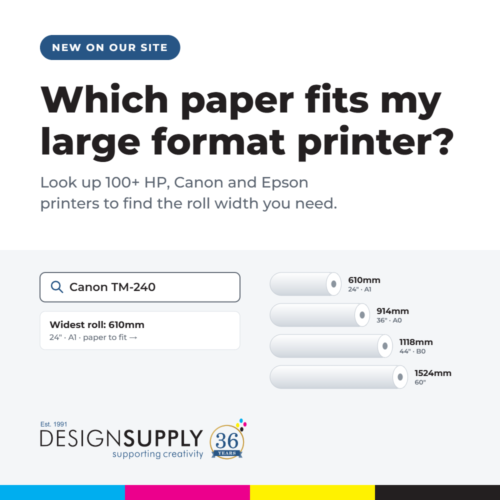
“Which paper fits my large format printer?” is one of the questions our sales team hears most. So we’ve built a page that answers it in seconds: Which paper fits my large format printer? Type in your model and it shows the widest roll your printer takes, with a paper that fits and a link to buy it. Below, we’ve also put together a quick guide to large format paper roll sizes, so you can see how inches, millimetres and A sizes match up.
What’s on the page
The lookup covers over 100 current and recent large format printers from the three manufacturers we’re accredited with:
- HP DesignJet, from the T120 and T230 up to the T1700, the multifunction T850 and T950 MFPs, and the Z6 and Z9+ photo printers.
- Canon imagePROGRAF, including the new TM-240, TM-340, TM-500 and TM-600 ranges, the TX-3300 and TX-4300, and the PRO and GP photo and poster printers.
- Epson SureColor, from the SC-T3100 and SC-T5700D CAD printers to the SC-P900, SC-P9500 and 64-inch SC-P20500 photo printers.
For each printer you’ll see:
- its widest roll width, in millimetres and inches, with the paper size that fits (A2, A1, A0 or B0)
- a paper we’d recommend in that width, such as DS Jet White MasterQ 90gsm 610mm x 50m for an A1 CAD printer, or DSL Satin Microp Photo Paper 198gsm 1118mm x 30m for a 44-inch photo printer
- a link to every roll we stock in that width, from bond and coated paper to photo, canvas and vinyl
- a link to the printer itself, where we sell it
Large format paper roll sizes explained
Large format printers are usually described by their widest roll in inches. Here’s how that translates:
- 17-inch takes 432mm rolls, for A2 prints
- 24-inch takes 610mm rolls, for A1 prints
- 36-inch takes 914mm rolls, for A0 prints
- 42-inch and 44-inch take 1067mm and 1118mm rolls, for B0 and oversized prints
- 60-inch and 64-inch take 1524mm and 1626mm rolls, for banners, posters and exhibition graphics
One useful tip: narrower rolls fit too. A 36-inch printer happily runs a 610mm roll, which is handy if most of your work is A1 and you don’t want to trim down from A0.
How to use it
- Go to Which paper fits my large format printer?
- Type your model number in the search box. Just the number works best, for example “T650”, “TM-300” or “SC-T3100”.
- Click the paper link to buy, or “All rolls” to see every media we stock in your width.
If you’d rather browse by what you’re printing, our large format paper and media page lets you filter by CAD, posters, photo, canvas, vinyl and more, and by roll width.
Can’t see your printer?
Call the sales team on 020 7842 1555 or send us your printer model and we’ll recommend the right roll for what you print.
As a reminder, we’re now in our 36th year supplying large format printer solutions and have sold over 7,000 printers to architects, photographers and signage businesses across the UK. More about us here.