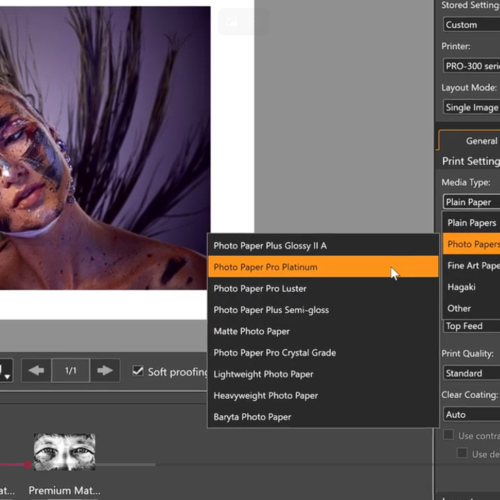
If you’re printing photography or fine art on a Canon imagePROGRAF, there’s a free tool on Canon’s website that a lot of customers never get round to installing: Professional Print & Layout, or PP&L. Canon has just released a fresh set of training videos to make it easier to get the most from it, so it felt like a good moment to explain what it actually does.
What Professional Print & Layout Actually Does
PP&L is a free plug-in for Adobe Photoshop, Lightroom and Canon’s own Digital Photo Professional, built for imagePROGRAF PRO printers (and some compatible PIXMA PRO models) — both cut-sheet desktop machines and roll-fed. It brings your editing software and your printer into one window, so you’re checking colour and layout before you commit media and ink to a print, not after.
- Soft Proofing — preview on screen how colours will look on the specific media you’re about to print on, using ICC profiles for that paper. It’s the same profiling we covered in last week’s colour management post, just done directly inside Canon’s own software.
- Nesting — automatically arranges multiple images on a roll to minimise wasted media, or use the Slot function to position and size things manually.
- Black Point Compensation — helps preserve shadow detail so blacks don’t clip or look flat.
- DPRAW and HDR Print — recovers extra sharpness and dynamic range straight from RAW files.
New Video Guides: Entry, Intermediate and Advanced
Canon has just put out three short videos breaking PP&L down by skill level — useful whether you’re setting it up for the first time or training up a member of staff:
- Entry Level — covers the basics and getting your first print out.
- Intermediate Level — covers colour settings including pattern print, plus layout options and print modes like gallery wrap.
- Advanced Level — covers colour management modes, including ICC profiles, colour modes and rendering intent.
They’re short enough to work through over a coffee break, and worth bookmarking if you ever take on new staff or want a refresher yourself.
Getting It
PP&L is free to download directly from Canon for your specific imagePROGRAF model.
From Design Supply
Not sure which version applies to your printer, or want a hand setting up ICC profiles for the media you print on most? Take a look at the Canon imagePROGRAF Pro-Series range here, or email us at canon@designsupply.co.uk and we’ll talk you through it.
As a reminder, we’re now in our 36th year supplying large format printer solutions and have sold over 7,000 printers to architects, photographers and signage businesses across the UK — more about us here.
Looking forward to hearing from you.