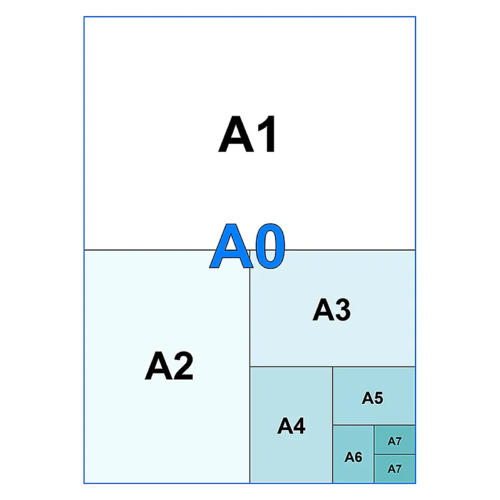
“Do I need a 24-inch or a 36-inch printer?” is one of the most common questions we get from customers who know they want to print A1 or A0 but aren’t sure what that means for the machine sat in their office. Printer widths are sold in inches, paper sizes are measured in millimetres, and the two don’t line up as neatly as you’d hope. Here’s the short version, followed by the detail.
The ISO sizes, in millimetres
A1 measures 594mm x 841mm. A0 measures 841mm x 1189mm — literally double the area of A1, and four times the area of A2. The number that matters for choosing a printer is the shorter of the two dimensions, because that’s the edge that has to fit across the printer’s width. Everything else feeds through as roll length, which is effectively unlimited.
A1 needs a 24″ (610mm) printer
A1’s short edge is 594mm, which is why every “24-inch” printer on the market — measured as 610mm — is built to handle it, with a little room to spare for margins. In our current range that includes the Canon TM-200, TM-240, TM-250 and TM-255, the Canon imagePROGRAF GP-200 and PRO-2600, the Epson SureColor SC-T2100 and SC-T3405/SC-T3405N, and the HP DesignJet T630, T650, T830 MFP and the 24″ Z6/Z9 PostScript models. If you’re comparing options at this width, our A1 printer price comparison goes through ten of them from budget to premium.
A0 needs a 36″ (914mm) printer
This is the one that trips people up. A0’s long edge is 1189mm — nothing on the market prints that width in one pass. Instead, A0 sheets print with the 841mm edge running across the printer’s width and the 1189mm edge feeding through as length.
Since 841mm is wider than a 24″ roll but comfortably inside a 36″ (914mm) roll, A0 is a 36-inch printer job, not a 33-inch one as the raw millimetre figure might suggest.
Models in our range built for this width include the Canon imagePROGRAF TM-340, TM-350 and TM-355 (including the MFP LM36 print-and-scan variants), the Canon imagePROGRAF GP-300, the Epson SureColor SC-T5200 series, and the HP DesignJet T850 and T950. If your workload regularly runs larger than A0 — engineering drawings on oversized sheets, for example — the Canon imagePROGRAF GP-4000 and Epson SureColor SC-P8500D step up to 44″ (1118mm).
Matching the paper to the printer
Roll widths for paper follow the same logic, with one wrinkle worth knowing: manufacturers sell rolls at trade-standard widths (610mm, 841mm, 914mm) rather than the exact ISO dimension, to leave enough margin for feed tolerance and clean trimming. So while true A1 is 594mm, you’ll load a 610mm roll to print it — and while true A0 is 841mm, both 841mm and 914mm rolls are sold and used for it depending on the printer and how tight you want the trim.
| Paper size |
ISO dimensions |
Printer width needed |
Design Supply paper |
| A1 |
594mm x 841mm |
24″ (610mm) |
DS Jet White MasterQ 90gsm 610mm x 50m |
| A0 |
841mm x 1189mm |
36″ (914mm) |
DS Jet White MasterQ 90gsm 841mm x 50m / 914mm x 50m |
If you want a heavier stock for presentation prints rather than working drawings, our DS Matt Coated 170gsm and DS Gold Standard Premium 100gsm ranges are available in the same widths — worth asking us which suits your printer and finish before you order in bulk.
From Design Supply
If you’re not sure which width fits your workload — or you’ve got a printer already and just need the right paper for it — get in touch with the team and we’ll point you at the right machine or media rather than the most expensive one.
As a reminder, we’re now in our 36th year supplying large format printer solutions and have sold over 7,000 printers to architects, photographers and signage businesses across the UK — more about us here.
Looking forward to hearing from you.